
Excel is an integral tool for data entry, organization, and modeling. Given its widespread use, many entry-level accounting and finance roles expect employees to have a competent understanding of the program. Candidates and new hires should take the time to ensure they are proficient in Excel to stand out from the competition and create strong impressions with managers.
Let's look at some of Excel's essential functions you should know how to use and discuss how adding these skills to your resume can help you differentiate yourself.
1/ Data Formatting
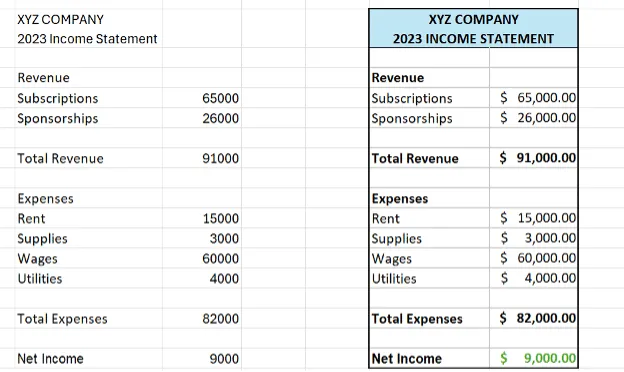
Entering clean and accurate data into your Excel file is an essential first step, but you shouldn't stop there. It is also important to present your data in a way that is easy for others to read and analyze. As an entry-level employee, customizing the appearance of your data to draw attention to important metrics and make it easy to interpret will impress your managers or clients and is a small thing to do to add value to your work. There are a few easy ways to clean up data in Excel, such as utilizing gridlines, borders, color fills, and text or cell formatting. Consider using the conditional formatting function to modify the appearance of your data based on specific rules you enter. You can see in the example below how using simple highlights and borders with the same data elevates the presentation.
2/ VLOOKUP
Excel has many formulas that can help you parse through large data sets without making manual adjustments. One of the more common Excel functions utilized is the VLOOKUP function which allows you to find data in one table from a corresponding data point in another.
=VLOOKUP(What you want to look up, where you want to look for it, the column number in the range containing the value to return, return an Approximate or Exact match – indicated as 1/TRUE, or 0/FALSE).
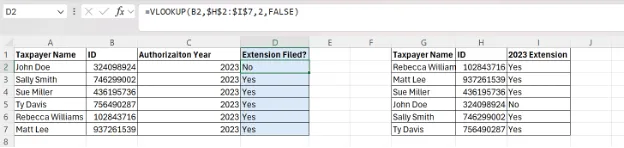
For example, say a tax return professional has two tables, one with a list of all authorized tax return preparation clients and another table of all taxpayers for which the company filed a tax return extension. Suppose an employee wants to confirm if the company filed an extension for all authorized clients. The employee can use the VLOOKUP function to search for the names or identification numbers of the clients on the authorization report and quickly cross-check the table containing the information about the extension. For those entries for which the formula returns a 'NO,' the employee knows which clients still require an extension. The cells highlighted in blue in the graphic below contain the VLOOKUP formula.
3/ Pivot Tables
As professionals, we often receive large data sets and are asked to derive meaning from them. A Pivot table is a valuable tool to summarize, review, and cleanly present data.
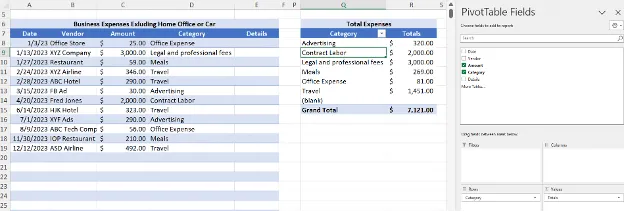
Let's say you are preparing a tax return for a self-employed individual with business expenses. The client sent you a list of their expenses with the applicable category for each one. Tax return preparers must summarize each expense category with the total amount reported for each on the individual's Schedule C. with a pivot table, you can easily summarize your client's expenses without utilizing any formulas or manual manipulation.
4/ SUMIF, COUNTIF
The SUM and COUNT formulas are both basic functions that can help you easily total or count data in a table. Taking these a step further and knowing how to use the SUMIF or the COUNTIF formulas allows you to work with more complex data sets and helps you stand out from those with only basic Excel skills.
=SUMIF(range of cells to evaluate based on the criteria, criteria or what cells should be added, which cells to add)
=COUNTIF(Where do you want to look?, What do you want to look for?)
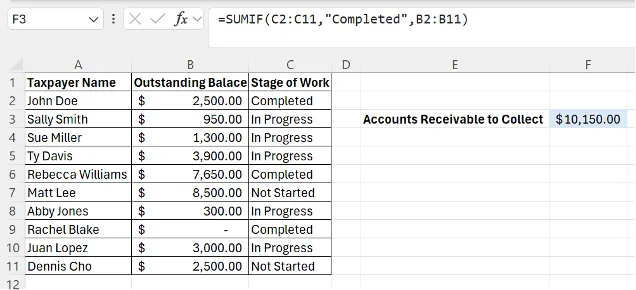
To better understand the SUMIF function, let's consider you have a table with accounts receivable data. You only want to know the total of open receivables for clients you have completed the work for. The SUMIF formula can quickly get you this information.
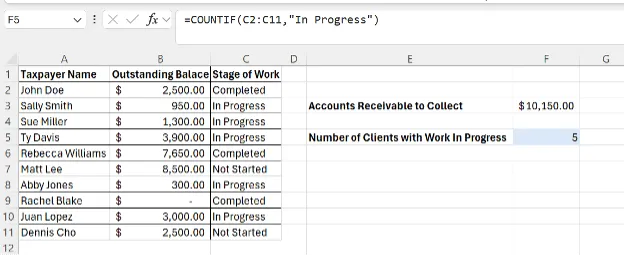
Similarly, using the same data set, you can use the COUNTIF function to count the number of clients' work still in progress.
5/ Financial Modeling
It is common for professionals in the accounting and finance industries to use Excel for financial modeling for things such as valuation, budgeting, and forecasting. Excel's spreadsheet view makes it easy to organize data for different models, allowing you to create an income statement, a budget, or a cash flow model. With your data organized in the program, you can use one of its many functions to interpret and analyze the data, utilizing formulas to calculate metrics like net income, net present value, or return on investment. Excel's forecasting function makes it possible to use historical data to predict future metrics or analyze trends.
Recommended: Our Valuation & Financial Modeling Bundle
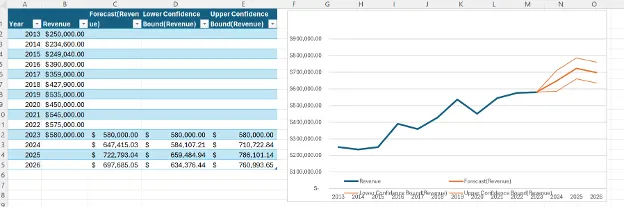
In the example below, the professional used historical data to predict revenue for the next three years. Excel displayed the model with three different confidence levels to help understand the accuracy of the predictions.
How to Leverage Excel Skills on Your Resume
When you're applying for competitive positions, having a polished resume will help you stand out from other candidates. If you want your Excel skills to help distinguish yourself, there are a few things you can do. Avoid only listing Excel under skills in your resume. This is very common and recruiters will likely gloss over it. Instead, write a line about how you used Excel in a previous role or one of your courses. For example, you can say, "Utilized Excel to model financial statements and analyze metrics for financial planning." This not only conveys the message that you have experience using the program but also highlights skills you can bring to the position. Additionally, consider including any courses you have taken in Excel and some of the skills you learned from them that would apply to the position you are applying to. As with anything you list on your resume, always be ready to discuss it when asked in an interview and, if necessary, brush up on your Excel skills if it has been a while since you last used it.
Conclusion
Excel is an excellent tool commonly used in financial and accounting positions. Help yourself stand out from other candidates by learning these basic Excel skills and highlighting them on your resume.